2026.11.0
1. Key highlights
-
Project templates can now declare required libraries. These libraries are automatically selected during project creation and cannot be unselected.
-
Downstream projects can now customize node styles without modifying the diagram descriptions.
2. Breaking changes
-
Add a new module named
sirius-web-core-domainto extract the core reusable parts ofsirius-web-domain. The classesModule,Window,Failure,IResult,Success, andAbstractValidatingAggregateRoothas been moved to this new module. Imports of these classes must be updated to:-
org.eclipse.sirius.web.core.domain.annotations.Module -
org.eclipse.sirius.web.core.domain.pagination.Window -
org.eclipse.sirius.web.core.domain.results.Failure -
org.eclipse.sirius.web.core.domain.results.IResult -
org.eclipse.sirius.web.core.domain.results.Success -
org.eclipse.sirius.web.core.domain.AbstractValidatingAggregateRoot
-
-
Default tools are now provided only for low-code studios. Each downstream project using programmatic APIs and the old
DefaultToolsFactoryto define its view should now define its own default tools. -
Workbench views have been reworked: they are now collapsible, and their toolbar and title bar have been merged into a single header bar. A new component
ViewAccordionhas been introduced to capture this new design, with two new subcomponents:-
ViewAccordionToolbarif the view has a toolbar -
ViewAccordionContentfor the content of the view. Downstream projects should now reuse them to align with the new design.
-
-
The workbench header bar (merge of the title + toolbar) now has a grayish background. This color can be changed through the theme palette
view.background. Defining this color may be required. -
Classes from the library domain such as
Library,ILibrarySearchService,ILibraryCreationServiceorLibraryCreatedEventhave been moved to the new modulesirius-web-library-domain. Imports of these classes must be updated to:-
org.eclipse.sirius.web.library.domain.Library -
org.eclipse.sirius.web.library.domain.services.api.ILibrarySearchService -
org.eclipse.sirius.web.library.domain.services.api.ILibraryCreationService -
org.eclipse.sirius.web.library.domain.events.LibraryCreatedEvent
-
-
A list of required libraries must now be provided when creating a
ProjectTemplate. -
Classes from the image domain such as
Image,IImageSearchService,IImageCreationServiceorImageCreatedEventhave been moved to the new modulesirius-web-images-domain. Imports of these classes must be updated to:-
org.eclipse.sirius.web.images.domain.Image -
org.eclipse.sirius.web.images.domain.services.api.IImageSearchService -
org.eclipse.sirius.web.images.domain.services.api.IImageCreationService -
org.eclipse.sirius.web.images.domain.events.ImageCreatedEvent
-
-
Switch to Spring Boot 4.1.1
-
Remove the field
ErrorPayload#messagein favor ofErrorPayload#messages. -
The project images part of the Sirius Web domain has moved to the dedicated Maven module
sirius-web-projects-images-domain. Downstream consumers must declare this dependency and replace the package prefixorg.eclipse.sirius.web.domain.boundedcontexts.projectimagewithorg.eclipse.sirius.web.projects.images.domain, including itsevent,repositories,services, andservices.apisubpackages. -
The project semantic data part of the Sirius Web domain has moved to the dedicated Maven module
sirius-web-projects-semanticdata-domain. Downstream consumers must declare this dependency and replace the package prefixorg.eclipse.sirius.web.domain.boundedcontexts.projectsemanticdatawithorg.eclipse.sirius.web.projects.semanticdata.domain, including itsevents,repositories,services, andservices.apisubpackages. -
Remove the deprecated types
IObjectServiceandObjectServicesince they have been replaced a long time ago by smaller services such asIIdentityService,IObjectSearchService,ILabelService, etc. -
Reduce the dependency of the images bounded context on
sirius-web-domainby adding a dedicated configuration module,sirius-web-images-infrastructure, for its internationalization support. -
Reduce the dependency of the project images bounded context on
sirius-web-domainby adding a dedicated configuration module,sirius-web-projects-images-infrastructure, for its internationalization support. -
Reduce the dependency of the project semantic data bounded context on
sirius-web-domainby adding a dedicated configuration module,sirius-web-projects-semanticdata-infrastructure, for its internationalization support. -
clearHandlerProviderhas been removed fromReferenceWidgetDescription.referenceNameProviderhas been added toReferenceWidgetDescriptionand is mandatory. A new API has been added to replaceclearHandlerProvider:IReferenceWidgetClearHandler, a candidate to handle the clear event. Sirius Web providesViewReferenceWidgetClearHandlerfor View-based representations,DetailsViewReferenceWidgetClearHandlerfor the default EMF properties,NodeStyleReferenceWidgetClearHandlerfor custom node style properties,EdgeStyleReferenceWidgetClearHandlerfor custom edge style properties, andTaskReferenceWidgetClearHandlerfor Task properties. Contributed programmatic views not relying on View DSL should have their own implementation ofIReferenceWidgetClearHandler. -
Reference widget EMF edit classes have been moved from
org.eclipse.sirius.components.widgetstoorg.eclipse.sirius.components.view.widgetto match their domain classes. -
The clear button of the widget reference is now driven by a dedicated EClass in the View DSL. Its body defines the clear behavior; an empty body clears the reference using the default behavior. New Studio widgets contain a default clear operation. All existing representations and the Sirius Web details view are automatically migrated. Programmatic form descriptions should manually add it through
ReferenceWidgetDescription.Builder#clearButtonDescription. -
Reference widget creation handlers are now form handlers instead of editing context handlers.
IReferenceWidgetCreateElementHandler#canHandlenow accepts aFormDescriptioninstead of a widget description ID.ReferenceWidgetDefaultCreateElementHandlerhas been replaced byViewReferenceWidgetCreateElementHandlerfor View-based forms,DetailsViewReferenceWidgetCreateElementHandlerfor the default EMF properties,NodeStyleReferenceWidgetCreateElementHandlerfor custom node style properties,EdgeStyleReferenceWidgetCreateElementHandlerfor custom edge style properties, andTaskReferenceWidgetCreateElementHandlerfor Task properties. Other programmatic forms must contribute their own creation handler. ThereferenceWidgetRootCreationDescriptionsandreferenceWidgetChildCreationDescriptionsGraphQL queries now require the host form’srepresentationId. -
The
getPalettequery is no longer used to compute if a node has an edge creation tool (and thus if a diagram element should render edge creation handles). A new queryconnectorToolCandidateDescriptionIds(diagramElementId: ID!): [ID!]!is used instead, it returns all element description id that are target candidate for a given source element. This query is using theIConnectorToolCandidateDescriptionIdsProvider, a default implementation is provided. Thepreconditionof an edge tool is no longer evaluated when computing if an element should display its creation handles. -
Reference widgets now have an optional create button description. Existing persisted View descriptions are migrated to keep their create button. Programmatic descriptions must explicitly configure
createButtonDescriptionto keep the creation action. Custom creation handlers must replace the last description ID argument ofcreateRootObjectandcreateChildwith theReferenceWidget. These methods now returnIStatus, and custom operations can succeed without returning an object. -
The
getPalettequery no longer return edge tool, usegetConnectorPaletteinstead if needed. -
Classes from the projects domain such as
Project,IProjectSearchService,IProjectCreationServiceorProjectCreatedEventhave been moved to the new modulesirius-web-projects-domain. Imports of these classes must be updated to:-
org.eclipse.sirius.web.projects.domain.Project -
org.eclipse.sirius.web.projects.domain.services.api.IProjectSearchService -
org.eclipse.sirius.web.projects.domain.services.api.IProjectCreationService -
org.eclipse.sirius.web.projects.domain.events.ProjectCreatedEvent
-
-
org.eclipse.sirius.components.widget.reference.ReferenceWidgetnow requirestargetObjectId. -
Connector tools in the diagram View DSL are now configured directly on node and edge descriptions using
edgeTools. TheedgeToolsproperties of node palettes, edge palettes, and node tool sections have been removed. Existing saved View descriptions are migrated automatically, preserving tool order; edge tools previously placed in sections become a flat list. Programmatic descriptions must move their tool declarations toNodeDescriptionBuilder.edgeTools(…)orEdgeDescriptionBuilder.edgeTools(…). -
addHandlerProviderhas been removed fromReferenceWidgetDescription. A new API has been added to replaceaddHandlerProvider:IReferenceWidgetAddElementHandler, a candidate to handle the add event. Sirius Web providesViewReferenceWidgetAddElementHandlerfor View-based representations,DetailsViewReferenceWidgetAddElementHandlerfor the default EMF properties,NodeStyleReferenceWidgetAddElementHandlerfor custom node style properties,EdgeStyleReferenceWidgetAddElementHandlerfor custom edge style properties, andTaskReferenceWidgetAddElementHandlerfor Task properties. Contributed programmatic views not relying on View DSL should have their own implementation ofIReferenceWidgetAddElementHandler. Theaddreference widget feature cannot use rendering AQL variables such as the one provided by aForelement. -
bodyreference ofReferenceWidgetin View DSL cannot be used to describe the behavior of the add element feature anymore. Instead, useadd. For multivalued references, an absentadddisables value selection and addition. An emptyadduses the default addition behavior; a populatedaddexecutes its operations. Whenaddis present, itspreconditionExpressioncontrols whether values can be selected for multivalued references; an empty expression allows selection. Existing representations have been migrated but programmatic one must be migrated manually. -
setHandlerProviderhas been removed fromReferenceWidgetDescriptionandsetHandlerhas been removed fromReferenceWidgetandReferenceElementProps. A new API has been added to replacesetHandlerProvider:IReferenceWidgetSetElementHandler, a candidate to handle the set event. Sirius Web providesViewReferenceWidgetSetElementHandlerfor View-based representations,DetailsViewReferenceWidgetSetElementHandlerfor the default EMF properties,NodeStyleReferenceWidgetSetElementHandlerfor custom node style properties,EdgeStyleReferenceWidgetSetElementHandlerfor custom edge style properties, andTaskReferenceWidgetSetElementHandlerfor Task properties. Contributed programmatic views not relying on View DSL should have their own implementation ofIReferenceWidgetSetElementHandler. Thesetreference widget feature cannot use rendering AQL variables such as the one provided by aForelement. -
bodyreference ofReferenceWidgetin View DSL cannot be used to describe the behavior of thesetelement feature anymore and has been removed. Instead, useset. For monovalued references, an absentsetdisables value selection. An emptysetuses the default setting behavior; a populatedsetexecutes its operations. Whensetis present, itspreconditionExpressioncontrols whether values can be selected for monovalued references; an empty expression allows selection. Existing representations have been migrated but programmatic one must be migrated manually. -
itemRemoveHandlerProviderhas been removed fromReferenceWidgetDescription.removeHandlerhas been removed fromReferenceValue. A new API has been added to replaceitemRemoveHandlerProvider:IReferenceWidgetRemoveHandler, a candidate to handle the remove event. Sirius Web providesViewReferenceWidgetRemoveElementHandlerfor View-based representations,DetailsViewReferenceWidgetRemoveElementHandlerfor the default EMF properties,NodeStyleReferenceWidgetRemoveElementHandlerfor custom node style properties,EdgeStyleReferenceWidgetRemoveElementHandlerfor custom edge style properties, andTaskReferenceWidgetRemoveElementHandlerfor Task properties. Contributed programmatic views not relying on View DSL should have their own implementation ofIReferenceWidgetRemoveHandler. -
Reference widget creation no longer invokes the widget’s
addorsetaction. Default creation assigns the created object directly to the reference; custom creation bodies and contributed handlers must perform their own reference updates. -
Each edge tool can now have its own palette, without a palette the body of the edge tool will be executed when making a connection. Existing edge tool actions are moved into a same-named tool in that palette automatically. Programmatic descriptions can configure the edge tool palette and its tools or rely on the edge tool body in order to offer a default behavior (without rendering a palette).
-
The query
connectorPalette(sourceDiagramElementId: ID!, targetDiagramElementId: ID!)now returnsunion ConnectorPaletteResult = Palette | SingleClickOnTwoDiagramElementsTool. ThegetConnectorToolsfrom the providerIConnectorPaletteProviderreturn a typedIConnectorToolsProviderResultthat can either berecord DefaultConnectorToolResult(SingleClickOnTwoDiagramElementsTool tool) implements IConnectorToolsProviderResultorrecord ConnectorPaletteResult(Palette palette) implements IConnectorToolsProviderResultThis change makes it so that when a palette is defined under anedgeToolon a view dsl, then the palette is always rendered when making a connection. If no palette is defined inside theedgeTool, then theedgeToolbody will be executed directly after making a connection.
3. Dependency updates
-
Switch to Spring Boot 4.1.1.
-
Switch to @testing-library/user-event 14.6.7.
-
Switch to @testing-library/react 16.3.3.
-
Switch to turbo 2.10.12.
-
Switch to Vite 8.3.0 and @vitejs/plugin-react 6.1.1
-
Switch to node.js 24.20.0 and npm 11.19.0 for our development environment.
-
Remove
connectorToolsfield from GraphQL typeDiagramDescriptionand related DTO, useconnectorPaletteinstead,IConnectorToolsProvider&GetConnectorToolsEventHandlerhave been removed too. -
Switch to ArchUnit 1.5.0 and jmolecules 2.0.1 for our backend architecture tests
-
Switch to EMFJson 2.5.5
-
Switch to apollo-client 3.14.1
4. Bug fixes
-
Icon label nodes can now be moved inside free-form containers.
-
Border nodes can now display their configured child and border nodes.
-
The available
selfvariable for thepreconditionof theconnector paletteis now set to thesemantic sourceof connection (it was previously the target). -
Add missing palette for the views explorer representation
-
Fix an issue where the global selection was not correctly updated after opening the palette on the diagram.
-
The active representation tab is now closed automatically when it is deleted.
-
Prevent a project style customization from being registered twice for the same project.
-
The Details form in the VS Code extension no longer displays an overlapping workbench header.
-
Reference widgets in Papaya Details views now execute their configured operations, including custom behavior defined through the View DSL.
5. New features
-
Project templates can now define required libraries by namespace, name, and version. When users create a project from such a template, the required libraries are selected automatically and cannot be unselected.
-
Add a new menu button in the diagram panel to manage the current selection. Available default actions are:
-
Select all nodes
-
Selected all edges
-
Unselect child nodes
-
Unselect nodes
-
Unselect edges
-
-
Add
IDiagramToolbarFilterSelectionProviderto add options to the manage diagram selection diagram toolbar tool. -
Add
IDiagramToolbarFilterSelectionHandlerto add handlers to the manage diagram selection diagram toolbar tool. -
Add support for node style customization. Implement
INodeStyleCustomizerto customize node styles. Each customizer determines which nodes it applies to. All applicable customizers are applied, but their order is unspecified. If multiple customizers modify the same style property, the last one wins. -
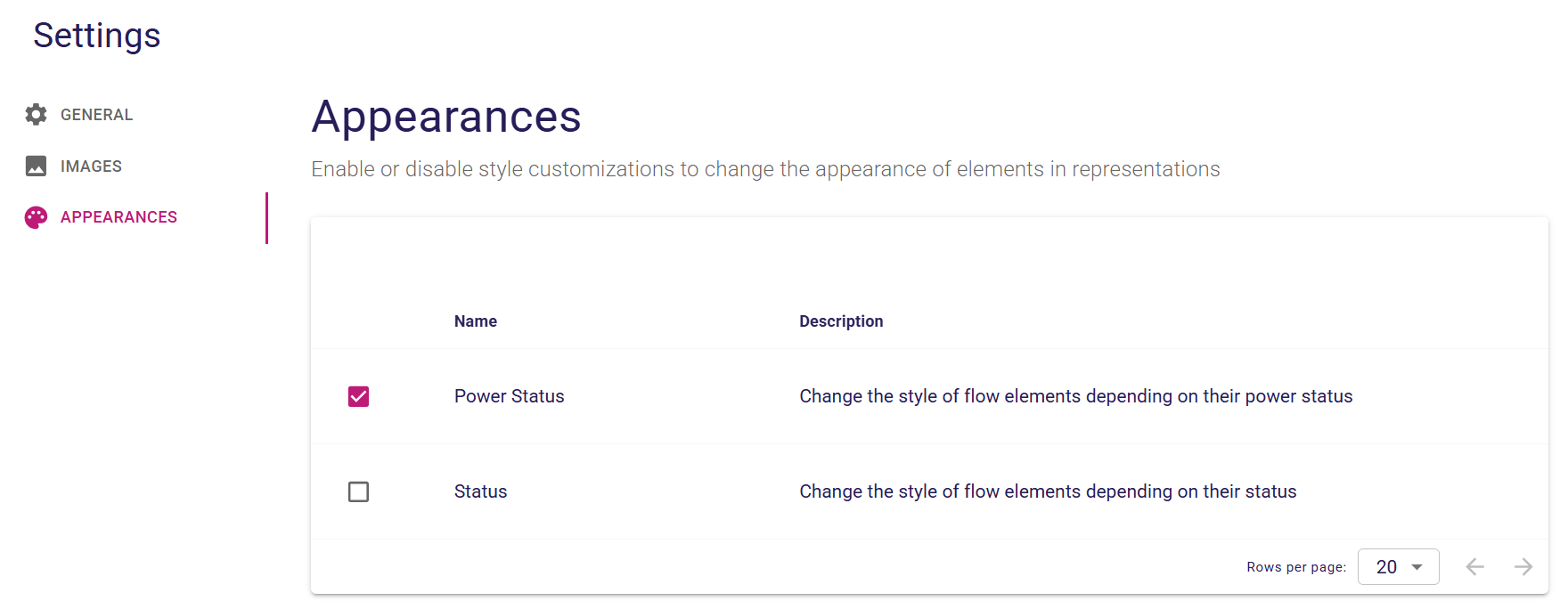
Project style customizations can now be enabled or disabled from the Appearances tab in the project settings. When changing their activation is not allowed, the checkboxes remain visible but are disabled. Their effect depends on how they are used by the application. For example, node style customizers can use their activation state to decide whether to apply their rules.
-
In forms, specifiers can now configure whether reference widgets show a clear button in the View DSL.
-
In forms, specifiers can now configure reference-widget clear-button behavior through its View DSL operation body.
-
In forms, specifiers can now configure reference-widget remove item feature behavior through its View DSL operation body.
-
Studio makers can now show or hide the reference widget’s create button by adding or removing its create button description. The form editor preview reflects this configuration. The create button description can contain operations to customize its behavior. When its body is empty, the button retains the default creation behavior.
-
Downstream projects can provide an
IRepresentationRenderVariableCustomizerto add variables to the variable manager during the rendering/refresh phase. UseIRepresentationRenderVariableCustomizerwith caution: these customizers operate at the representation level and may be invoked during the rendering/refresh phase for any representation type. Currently, these customizers are used for tree and diagram representations. Downstream projects contributing anIRepresentationRenderVariableCustomizerare responsible for ensuring that it does not pollute the context of other representations. A good practice is to use the representation’s description to determine whether to contribute a variable.
6. Improvements
-
Specifiers customizing the creation, deletion, edition and drop of cards will now be able to leverage the
editingContextvariable. -
Update the backend documentation and add a first schema of the lifecycle of the backend with the creation of a project.
-
Added more
AQL variablesavailable when computing the precondition of a tool in a palette, this includes for aconnector palette:environment,diagramServices,selectedNode,selectedEdgeand for adiagram element palette:environment,diagramServices. -
Extract the appearance logic of nodes and edges in a dedicated service.
-
In forms, the RichTextEditor widget can now insert, open, edit, and delete links using a dedicated link popup.
-
Extract the logic to check if a project has the FLOW nature into a dedicated predicate.
-
Introduced the
PageInfoAssertfor testing the page info returned by query runner when using the cursor-based pagination in integration tests. -
Export
FilterBarContextfromsirius-components-treesin order to reuse filter bar logic more easily. -
Introduce the
RenameProjectExecutorto execute the rename project mutation, and perform assertion on the result with theRenameProjectAssertin integration tests. -
Add the ability to customize the default result of the
ICapabilityEvaluatorinstead of defaulting totruewhen noICapabilityVotertakes part in the evaluation. -
Align the refresh of the Gantt representation on the new APIs already used by deck and validation.
-
Introduce documentation for the reference widget.
-
Downstream projects which need to customize the behavior of the details view by contributing new page descriptions could do so by using
IPropertiesDescriptionRegistryConfigurer. This created issues if the downstream project used the View DSL because the representation description could not be found in the editing context. It also requires the downstream project to convert the view based representation description "manually". A new API has been introduced to support this use case more properly, for that downstream projects can now contribute anIDetailsViewPageDescriptionProviderDelegatewhich can use the editing context to find the page descriptions from the representation descriptions of the editing context. As such, the view based representation description can be registered as usual and converted by Sirius Web. You just have to find it in the editing context and return it from the delegate. It will also allow to share a form description between the details view and a regular form representation.
7. Deprecation warnings
-
Improve the consistency of the variables used. For that the available variables will be found in dedicated variables classes such as:
-
org.eclipse.sirius.components.representations.RepresentationVariables -
org.eclipse.sirius.components.core.api.variables.CoreVariablesThese variable declarations allow us to easily find all the available variables instead of having to look at various types scattered all accross the codebase. On top of that, they are now being used for the generation of the documentation of the View DSL builders and are used to validate the execution of some behavior at runtime. We have thus starting to deprecate the existing variable constants which will be replaced by the new ones in the dedicated variables classes. At the moment, we have only deprecatedVariableManager.SELFwhich has been replaced byRepresentationVariables.SELF.name()andIEditingContext.EDITING_CONTEXTwhich has been replaced byCoreVariables.EDITING_CONTEXT.name(). We will not remove existing variable constants such asVariableManager.SELFandIEditingContext.EDITING_CONTEXTsoon, but we will start using these new locations for the variables in our own codebase. When we will be satisfied with the use of these new variable declarations, we will change their annotation from@Deprecated(since = "…")to@Deprecated(since = "…", forRemoval = true)and warn downstream consumers in the CHANGELOG and release notes of that version that they should migrate to the new variable declarations. Then, we will remove the existing variable declarations in a future release.
-
8. Technical details
-
For technical details on this Sirius Web release, including breaking changes, please refer to changelog.